Appearance
Prompt 和 AI 增量流式渲染
Prompt 微调
关键词生成
js
await fetchGpt(`你的任务是根据给定的企业属性,生成与企业属性和短视频拍摄相关的主题关键词。
以下是企业属性:
<企业属性>
  {{COMPANY_ATTRIBUTE}}
</企业属性>
{{COMPANY_ATTRIBUTE}}变量内容为:${promptVar}
请按照以下要求生成关键词:
1. 每个关键词的字数控制在3 - 4个字以内。
2. 生成的关键词数量必须在10 - 15个。
3. 关键词之间用','隔开,不要额外内容,便于我做切割。
`)违禁词检测
先通过内部的违禁词接口检测违禁词列表(只包含了骂人的词),然后通过提示词将骂人的词+全部台词文本喂给 AI(不符合直播间规范的词汇交给 AI 自行处理),最后返回需要的 JSON 内容。
js
const prompt = `你要对直播类内容进行违禁词检查和替换操作。你的任务是检查给定的直播内容,找出其中的违禁词,并将其替换为合适的表述。对于存在夸大效果等不符合直播间规范的词汇,要替换为合适的中性表述;对于骂人的脏话,要把辱骂的词语换成*号,星号个数根据辱骂的长度来显示,且替换内容不允许为空、不允许太长。
首先,请仔细查看以下违禁词列表,这是一个字符串数组:
<违禁词列表>
{ { \${JSON.stringify(err_words || \`[]\`)} }
</违禁词列表>

接下来,请检查以下直播内容文本,这是一个包含违禁词的字符串:

<直播内容文本>
{ { \${content} } }
</直播内容文本>

在检查和替换时,请严格按照以下步骤操作:
1. 把直播内容文本中的每个词与违禁词列表进行逐一比对,请严格按照要求替换:只对在违禁词列表中的词汇进行替换,若词汇不在违禁词列表中,即使它是违禁词也不进行处理。
2. 一旦发现违禁词,对于存在夸大效果等不符合直播间规范的词汇,用恰当的中性表述进行替换。例如,将“最好”替换为“非常好”;若遇到骂人的脏话,把辱骂的词语换成*号,星号个数根据辱骂的长度来确定,保证替换后的表述符合直播间的用语规范。合适的中性表述需根据具体违禁词和语境来确定,要确保语义通顺且不违反规则。
3. 详细记录所有被替换的违禁词以及替换后的内容。

最后,必须严格按照以下JSON格式返回结果,不得包含其他内容:
{"content": "完整的替换内容", "words": [{"error_words":"包含违禁词的字符串1", "replace_words":"对应的替换内容1"}, {"error_words":"包含违禁词的字符串2", "replace_words":"对应的替换内容2"}, ...]}\`AI 直播台词流式生成渲染
使用 v-html 渲染
vue
<template>
  <div
    class="stream-markdown-body"
    v-html="renderedContent"
  ></div>
</template>

<script setup lang="ts">
import { ref, onMounted } from 'vue'
import MarkdownIt from 'markdown-it'
// markdown文本数据
import { markdownSample } from '../mock/markdownData'

const renderedContent = ref('')
const md = new MarkdownIt()
const buffer = ref('')

// 模拟流式数据接收
const simulateStream = () => {
  const markdown = markdownSample

  const chars = markdown.split('')
  let index = 0

  const renderNext = () => {
    if (index < chars.length) {
      appendChunk(chars[index])
      index++
      // 随机延迟模拟网络请求
      setTimeout(renderNext, Math.random() * 100 + 20)
    }
  }

  renderNext()
}

// 处理流式数据
const appendChunk = (chunk: string) => {
  buffer.value += chunk
  renderedContent.value = md.render(buffer.value)
}

onMounted(() => {
  simulateStream()
})
</script>v-html 缺点
- 存在 XSS 风险
- 无法渲染自定义组件(web components 是可以的,但是 vue 组件不行)
- 全量渲染无状态:每次更新都会重新生成整个 HTML 字符串,无法追踪 DOM 状态(如表单输入值、滚动位置等),导致交互体验差。
- 失去 Vue 响应式优势:无法利用 Vue 的虚拟 DOM diff 算法实现增量更新(如仅更新变化的文本或样式),性能较低。
优化:Markdown 增量渲染
实现思路:
- 采用 markdown-it 将 markdown 文本转为 token
- 将 token 转为(递归) vnode 进行渲染
节点类型:
在markdown-it中,节点类型(token.type)非常多,大致分为:块级标签(_open/_close)、行内标签(_open/_close)、自闭合标签(如 hr、image)、容器(如 inline) 和文本(text)
txt
例如:这是**加粗**的文本和[链接](https://github.com)
转为的 token 树结构如下:
paragraph_open(块级开始)
  inline(行内容器)
    text(文本:这是)
    strong_open(加粗开始)
    text(文本:加粗)
    strong_close(加粗结束)
    text(文本:的文本和)
    link_open(链接开始)
    text(文本:链接)
    link_close(链接结束)
paragraph_close(块级结束)不管如何嵌套,
text节点才是渲染内容的。
除此之外,还有一些其他类型:
md
code_inline: 'code', // 行内代码
fence: 'code', // 代码块
image: 'img', // 图片
html_block: 'div', // HTML 块级标签
html_inline: 'span', // HTML 行内标签,例如这样的 p 标签会被渲染成行内的:[<p>url</p>](url)
hr: 'hr', // 分割线实现代码:
vue
<template>
  <component :is="render" />
</template>

<script setup lang="ts">
import { ref, onMounted, h, type VNode, createTextVNode } from 'vue'
import MarkdownIt from 'markdown-it'
import { markdownSample } from '../mock/demo'
import type { Token } from 'markdown-it/index.js'

const md = new MarkdownIt({
  html: true
})

onMounted(() => {
  simulateStream()
})

const mdTokens = ref<Token[]>([])
let buffer = ref('')

// 模拟流式数据接收
const simulateStream = () => {
  const markdown = markdownSample
  const chars = markdown.split('')
  let index = 0

  const renderNext = () => {
    if (index < chars.length) {
      appendChunk(chars[index])
      index++
      // 随机延迟模拟网络请求
      setTimeout(renderNext, Math.random() * 10 + 20)
    }
  }
  renderNext()
}

// 处理流式数据
const appendChunk = (chunk: string) => {
  buffer.value += chunk
  const token: Token[] = md.parse(buffer.value, {})
  mdTokens.value = token
}

const render = () => {
  return h('div', {}, renderTokens(mdTokens.value))
}

// 核心逻辑
const renderTokens = (tokens: Token[]): VNode[] => {}
</script>renderTokens实现:
renderTokens 方法的核心思路是将 Markdown 解析得到的 tokens 数组递归转换为 Vue 虚拟 DOM(vnode),从而实现 Markdown 内容的渲染。
数据结构:
- tokens:Markdown 解析后得到的标记数组,每个 token 包含
type(类型,如paragraph_open、text等)、tag(对应 HTML 标签)、attrs(属性)、content(内容)等信息。 - stack:栈结构,用于处理嵌套的标签(如
<ul>包含<li>,<div>包含<p>等),记录当前未闭合的父级节点。 - result:最终生成的 vnode 数组,作为渲染结果返回。
节点的处理:
- 开始节点:以
_open结尾的节点,如paragraph_open、list_item_open等,块和行级都是 - 结束节点:以
_close结尾的节点,如paragraph_close、list_item_close等,块和行级都是 - 行内容器:
type为inline的节点,是特殊的嵌套层级,需要递归穿透 - 文本节点:
type为text的节点,直接创建文本节点,每个节点的内容展示都在 text 中。 - 特殊节点:
fence:代码块html_block:HTML 块html_inline:HTML 行- 剩余节点:例如
image、hr、code_inline等
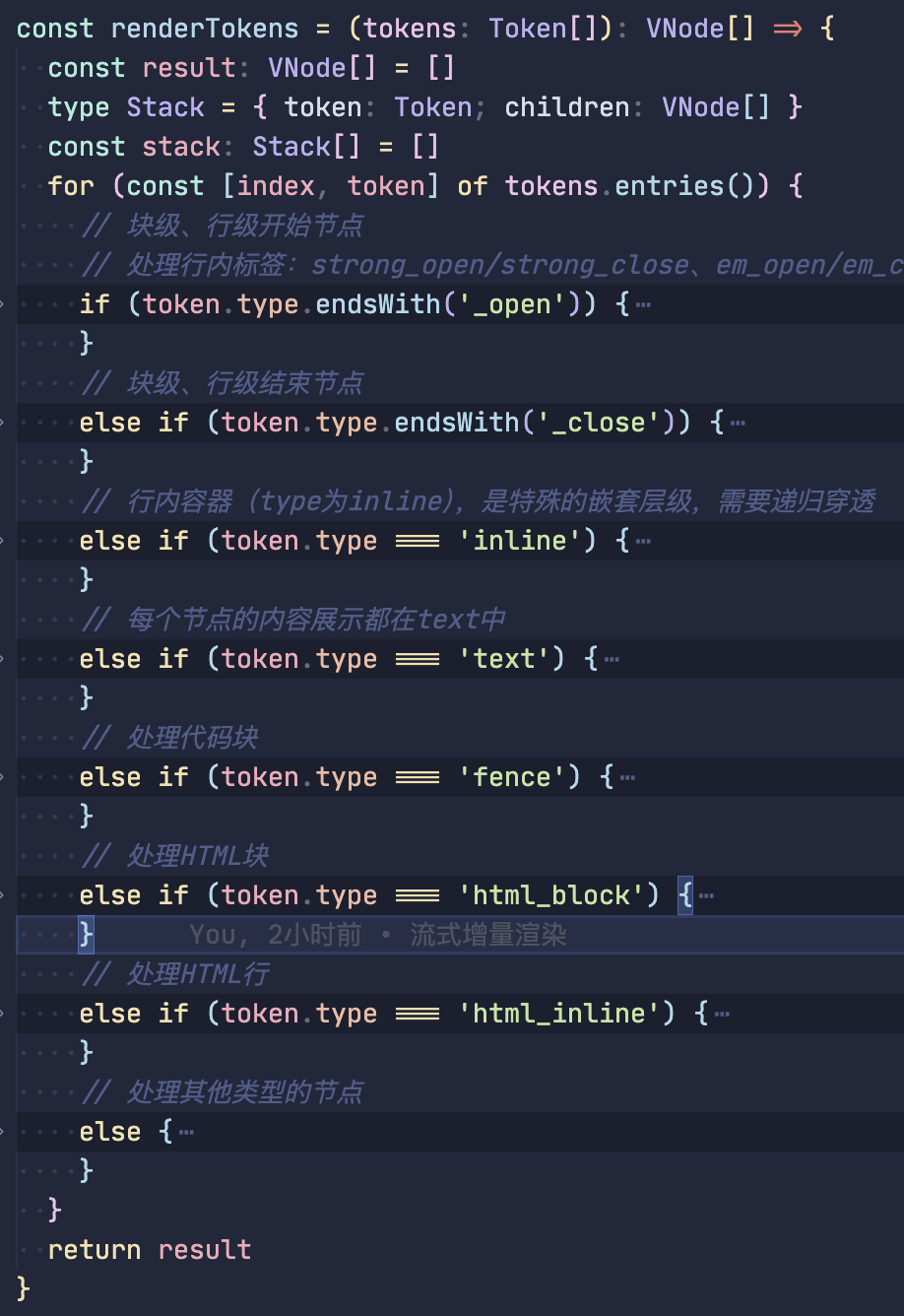
ts
// 块级、行级开始节点
// 处理行内标签:strong_open/strong_close、em_open/em_close也是如此
if (token.type.endsWith('_open')) {
  stack.push({
    token,
    children: []
  })
  continue
}ts
// 块级、行级结束节点
if (token.type.endsWith('_close')) {
  if (!stack.length) continue
  const { token: openToken, children: openTokenChild } = stack.pop() as Stack
  // xx_close节点都是有tag的
  const tag = openToken.tag
  // 开始标签上有attrs,例如[链接](https://github.com/),
  // type为link_open,attrs为['href', 'https://github.com/'][]
  // 制造vnode的attrs
  const attrs: Record<string, string> = {}
  if (openToken?.attrs) {
    // key:href,value:https://github.com/
    openToken.attrs.forEach(([key, value]) => (attrs[key] = value))
  }
  // 需要添加唯一key
  const vnode = h(
    tag,
    { ...attrs, key: `${openToken.type}-${index}` },
    openTokenChild
  )
  if (stack.length) {
    stack[stack.length - 1].children.push(vnode)
  } else {
    result.push(vnode)
  }
  continue
}ts
/**
 * 数据结构
 * Token: {
 *     type: 'inline',
 *     children: [
 *       {
 *          type: 'text',
 *          content: '这是'
 *       },
 *       {
 *           type: 'strong_open',
 *           tag: 'strong'
 *       },
 *       {
 *          type: 'text',
 *          content: '加粗'
 *       },
 *       {
 *           type: 'strong_close',
 *           tag: 'strong'
 *       }
 *    ]
 * }
 */
// 行内容器(type为inline),是特殊的嵌套层级,需要递归穿透
if (token.type === 'inline') {
  const children = renderTokens(token.children || [])
  if (stack.length > 0) {
    // 添加到栈末尾
    stack[stack.length - 1].children.push(...children)
  } else {
    // 添加到结果
    result.push(...children)
  }
  continue
}ts
if (token.type === 'text') {
  // const textVNode = token.content // 纯文本可直接作为vnode
  const textVNode = createTextVNode(token.content) // 纯文本可直接作为vnode
  if (stack.length) {
    stack[stack.length - 1].children.push(textVNode)
  } else {
    result.push(textVNode)
  }
  continue // 处理完文本,跳过后续判断
}ts
if (token.type === 'fence') {
  const language = token.info || 'plain'
  const codeContent = token.content
  const lines = codeContent.split('\n') // 按行拆分为增量单元数组
  const nodeLines: VNode[] = []
  for (const [i, line] of lines.entries()) {
    const lineVNode = h(
      'span',
      {
        key: `${token.type}-${i}`,
        style: { display: 'block', lineHeight: '1.5', height: '1.5rem' }
      },
      line
    )
    nodeLines.push(lineVNode)
  }
  const pre = h(
    'pre',
    { class: `language-${language}`, key: `${token.type}-${index}` },
    [...nodeLines]
  )
  result.push(pre)
  continue
}ts
if (token.type === 'html_block') {
  const vnode = h('div', {
    key: `html-block-${index}`,
    innerHTML: token.content
  })
  if (stack.length) {
    stack[stack.length - 1].children.push(vnode)
  } else {
    result.push(vnode)
  }
  continue
}ts
if (token.type === 'html_inline') {
  const vnode = createTextVNode(token.content)
  if (stack.length) {
    stack[stack.length - 1].children.push(vnode)
  } else {
    result.push(vnode)
  }
  continue
}ts
// 处理其他类型的节点
else {
  const tag = mapTokenToTag(token)
  const attrs: Record<string, string> = {}
  if (token.attrs) {
    token.attrs.forEach(([key, value]) => (attrs[key] = value))
  }
  const vnode = h(
    tag,
    { ...attrs, key: `${token.type}-${index}` },
    token.content ? [createTextVNode(token.content)] : []
  )
  if (stack.length) {
    stack[stack.length - 1].children.push(vnode)
  } else {
    result.push(vnode)
  }
}

const otherTag: Record<string, string | typeof Think> = {
  code_inline: 'code',
  fence: 'code',
  image: 'img',
  html_block: 'div',
  html_inline: 'span',
  hr: 'hr',
  // 添加自定义标签(vue组件)
  think: Think
}

// 映射函数:将token转换为对应的标签或组件
const mapTokenToTag = (token: Token): string | typeof Think => {
  // 使用otherTag映射表处理特殊标签
  if (token.tag && otherTag[token.tag]) {
    return otherTag[token.tag]
  }

  // 默认返回token的标签
  return token.tag || 'div'
}完整代码
vue
<template>
  <component :is="render" />
</template>

<script setup lang="ts">
import { ref, onMounted, h, type VNode, createTextVNode } from 'vue'
import MarkdownIt from 'markdown-it'
import { markdownSample } from '../mock/demo'
import type { Token } from 'markdown-it/index.js'
import { Think } from './Think'

const md = new MarkdownIt({
  html: true,
  linkify: true
})

onMounted(() => {
  simulateStream()
})

const mdTokens = ref<Token[]>([])
let buffer = ref('')

// 模拟流式数据接收
const simulateStream = () => {
  const markdown = markdownSample
  const chars = markdown.split('')
  let index = 0

  const renderNext = () => {
    if (index < chars.length) {
      appendChunk(chars[index])
      index++
      // 随机延迟模拟网络请求
      setTimeout(renderNext, Math.random() * 10 + 20)
    }
  }

  renderNext()
}

// 处理流式数据
const appendChunk = (chunk: string) => {
  buffer.value += chunk
  const token: Token[] = md.parse(buffer.value, {})
  mdTokens.value = token
}

const render = () => {
  return h('div', { class: 'markdown-body' }, renderTokens(mdTokens.value))
}

const renderTokens = (tokens: Token[]): VNode[] => {
  const result: VNode[] = []
  type Stack = { token: Token; children: VNode[] }
  const stack: Stack[] = []
  for (const [index, token] of tokens.entries()) {
    // 块级、行级开始节点
    // 处理行内标签:strong_open/strong_close、em_open/em_close也是如此
    if (token.type.endsWith('_open')) {
      stack.push({
        token,
        children: []
      })
      continue
    }
    // 块级、行级结束节点
    else if (token.type.endsWith('_close')) {
      if (!stack.length) continue
      const { token: openToken, children: openTokenChild } =
        stack.pop() as Stack
      // xx_close节点都是有tag的
      const tag = openToken.tag
      // 开始标签上有attrs,例如[链接](https://github.com/),
      // type为link_open,attrs为['href', 'https://github.com/'][]
      // 制造vnode的attrs
      const attrs: Record<string, string> = {}
      if (openToken?.attrs) {
        // key:href,value:https://github.com/
        openToken.attrs.forEach(([key, value]) => (attrs[key] = value))
      }
      // 需要添加唯一key
      const vnode = h(
        tag,
        { ...attrs, key: `${openToken.type}-${index}` },
        openTokenChild
      )
      if (stack.length) {
        stack[stack.length - 1].children.push(vnode)
      } else {
        result.push(vnode)
      }
      continue
    }
    // 行内容器(type为inline),是特殊的嵌套层级,需要递归穿透
    else if (token.type === 'inline') {
      const children = renderTokens(token.children || [])
      if (stack.length > 0) {
        // 添加到栈末尾
        stack[stack.length - 1].children.push(...children)
      } else {
        // 添加到结果
        result.push(...children)
      }
      continue
    }
    // 每个节点的内容展示都在text中
    else if (token.type === 'text') {
      // const textVNode = token.content // 纯文本可直接作为vnode
      const textVNode = createTextVNode(token.content) // 纯文本可直接作为vnode
      if (stack.length) {
        stack[stack.length - 1].children.push(textVNode)
      } else {
        result.push(textVNode)
      }
      continue // 处理完文本,跳过后续判断
    }
    // 处理代码块
    else if (token.type === 'fence') {
      const language = token.info || 'plain'
      const codeContent = token.content
      const lines = codeContent.split('\n') // 按行拆分为增量单元数组
      const nodeLines: VNode[] = []
      for (const [i, line] of lines.entries()) {
        const lineVNode = h(
          'span',
          {
            key: `${token.type}-${i}`,
            style: { display: 'block', lineHeight: '1.5', height: '1.5rem' }
          },
          line
        )
        nodeLines.push(lineVNode)
      }
      const pre = h(
        'pre',
        { class: `language-${language}`, key: `${token.type}-${index}` },
        [...nodeLines]
      )
      result.push(pre)
      continue
    }
    // 处理HTML块
    else if (token.type === 'html_block') {
      const vnode = h('div', {
        key: `html-block-${index}`,
        innerHTML: token.content
      })
      if (stack.length) {
        stack[stack.length - 1].children.push(vnode)
      } else {
        result.push(vnode)
      }
      continue
    }
    // 处理HTML行
    else if (token.type === 'html_inline') {
      const vnode = createTextVNode(token.content)
      if (stack.length) {
        stack[stack.length - 1].children.push(vnode)
      } else {
        result.push(vnode)
      }
      continue
    }
    // 处理其他类型的节点
    else {
      const tag = mapTokenToTag(token)
      const attrs: Record<string, string> = {}
      if (token.attrs) {
        token.attrs.forEach(([key, value]) => (attrs[key] = value))
      }
      const vnode = h(
        tag,
        { ...attrs, key: `${token.type}-${index}` },
        token.content ? [createTextVNode(token.content)] : []
      )
      if (stack.length) {
        stack[stack.length - 1].children.push(vnode)
      } else {
        result.push(vnode)
      }
    }
  }
  return result
}

const otherTag: Record<string, string | typeof Think> = {
  code_inline: 'code',
  fence: 'code',
  image: 'img',
  html_block: 'div',
  html_inline: 'span',
  hr: 'hr',
  // 添加自定义标签(vue组件)
  think: Think
}

// 映射函数:将token转换为对应的标签或组件
const mapTokenToTag = (token: Token): string | typeof Think => {
  // 使用otherTag映射表处理特殊标签
  if (token.tag && otherTag[token.tag]) {
    return otherTag[token.tag]
  }

  // 默认返回token的标签
  return token.tag || 'div'
}
</script>流式处理优化——智能解析
组件在流式传输期间自动完成不完整的粗体、斜体和代码格式,隐藏损坏的链接直到完成。
也就是流式传输时延迟渲染未闭合的标签,直到闭合标签出现后才渲染。
智能解析包括:
自动完成不完整的格式:
- Bold:
**incomplete→**incomplete**(自动关闭) - Italic:
*incomplete→*incomplete*(自动关闭) - Strikethrough:
~~incomplete→~~incomplete~~(自动关闭) - Inline code:
`incomplete→`incomplete`(自动关闭)
隐藏不完整的元素
- Links:
[incomplete text(隐藏直到]出现) - Images:
![incomplete alt(隐藏直到]出现) - Code blocks: Protects triple backticks from inline code completion 代码块:保护三重反引号免受内联代码补全的影响
思路
核心思路是 “先修复不完整语法,再安全渲染”,通过 “语法补全” 步骤
- 增量流中的 “语法截断” 问题
增量渲染(如实时加载 AI 回复)时,Markdown 文本会 “分段到达”,可能出现 未闭合的语法标记(例:只输出 **加粗 而没结尾 **、只输出 [链接而没]()),直接渲染会导致格式错乱(如后续文本全变粗)。
组件的首要目标就是:在渲染前自动识别并修复这些 “截断语法”。
parseIncompleteMarkdown函数的 “语法补全规则”
通过正则匹配+计数验证,针对常见 Markdown 语法,逐个识别未闭合标记并补全,核心规则如下:
未闭合的链接/图片(如
[文本、![图片):匹配(!?\[)([^\]]*?)$正则,直接删除未闭合的开头标记(避免残留语法干扰);成对格式补全(加粗
**、斜体*/__、删除线~~、行内代码`):- 用正则匹配结尾的未闭合标记(如
**文本结尾的**); - 统计整个文本中该标记的总数量(如
**的次数); - 若数量为奇数(说明未闭合),则在结尾补全一个标记(如补
**使总数为偶数);
- 用正则匹配结尾的未闭合标记(如
特殊排除:代码块优先级:处理行内代码
`时,先判断是否处于未闭合的代码块(```数量为奇数),若处于则不补全行内代码(避免干扰代码块语法)。
react 优化代码
tsx
'use client'
import { cn } from '@/lib/utils'
import type { ComponentProps, HTMLAttributes } from 'react'
import { isValidElement, memo } from 'react'
import ReactMarkdown, { type Options } from 'react-markdown'
import rehypeKatex from 'rehype-katex'
import remarkGfm from 'remark-gfm'
import remarkMath from 'remark-math'
import { CodeBlock, CodeBlockCopyButton } from './ui/shadcn-io/ai/code-block'
import 'katex/dist/katex.min.css'
import hardenReactMarkdown from 'harden-react-markdown'
/**
 * Parses markdown text and removes incomplete tokens to prevent partial rendering
 * of links, images, bold, and italic formatting during streaming.
 */
function parseIncompleteMarkdown(text: string): string {
  if (!text || typeof text !== 'string') {
    return text
  }
  let result = text
  // Handle incomplete links and images
  // Pattern: [...] or ![...] where the closing ] is missing
  const linkImagePattern = /(!?\[)([^\]]*?)$/
  const linkMatch = result.match(linkImagePattern)
  if (linkMatch) {
    // If we have an unterminated [ or ![, remove it and everything after
    const startIndex = result.lastIndexOf(linkMatch[1])
    result = result.substring(0, startIndex)
  }
  // Handle incomplete bold formatting (**)
  const boldPattern = /(\*\*)([^*]*?)$/
  const boldMatch = result.match(boldPattern)
  if (boldMatch) {
    // Count the number of ** in the entire string
    const asteriskPairs = (result.match(/\*\*/g) || []).length
    // If odd number of **, we have an incomplete bold - complete it
    if (asteriskPairs % 2 === 1) {
      result = `${result}**`
    }
  }
  // Handle incomplete italic formatting (__)
  const italicPattern = /(__)([^_]*?)$/
  const italicMatch = result.match(italicPattern)
  if (italicMatch) {
    // Count the number of __ in the entire string
    const underscorePairs = (result.match(/__/g) || []).length
    // If odd number of __, we have an incomplete italic - complete it
    if (underscorePairs % 2 === 1) {
      result = `${result}__`
    }
  }
  // Handle incomplete single asterisk italic (*)
  const singleAsteriskPattern = /(\*)([^*]*?)$/
  const singleAsteriskMatch = result.match(singleAsteriskPattern)
  if (singleAsteriskMatch) {
    // Count single asterisks that aren't part of **
    const singleAsterisks = result.split('').reduce((acc, char, index) => {
      if (char === '*') {
        // Check if it's part of a ** pair
        const prevChar = result[index - 1]
        const nextChar = result[index + 1]
        if (prevChar !== '*' && nextChar !== '*') {
          return acc + 1
        }
      }
      return acc
    }, 0)
    // If odd number of single *, we have an incomplete italic - complete it
    if (singleAsterisks % 2 === 1) {
      result = `${result}*`
    }
  }
  // Handle incomplete single underscore italic (_)
  const singleUnderscorePattern = /(_)([^_]*?)$/
  const singleUnderscoreMatch = result.match(singleUnderscorePattern)
  if (singleUnderscoreMatch) {
    // Count single underscores that aren't part of __
    const singleUnderscores = result.split('').reduce((acc, char, index) => {
      if (char === '_') {
        // Check if it's part of a __ pair
        const prevChar = result[index - 1]
        const nextChar = result[index + 1]
        if (prevChar !== '_' && nextChar !== '_') {
          return acc + 1
        }
      }
      return acc
    }, 0)
    // If odd number of single _, we have an incomplete italic - complete it
    if (singleUnderscores % 2 === 1) {
      result = `${result}_`
    }
  }
  // Handle incomplete inline code blocks (`) - but avoid code blocks (```)
  const inlineCodePattern = /(`)([^`]*?)$/
  const inlineCodeMatch = result.match(inlineCodePattern)
  if (inlineCodeMatch) {
    // Check if we're dealing with a code block (triple backticks)
    const hasCodeBlockStart = result.includes('```')
    const codeBlockPattern = /```[\s\S]*?```/g
    const completeCodeBlocks = (result.match(codeBlockPattern) || []).length
    const allTripleBackticks = (result.match(/```/g) || []).length
    // If we have an odd number of ``` sequences, we're inside an incomplete code block
    // In this case, don't complete inline code
    const insideIncompleteCodeBlock = allTripleBackticks % 2 === 1
    if (!insideIncompleteCodeBlock) {
      // Count the number of single backticks that are NOT part of triple backticks
      let singleBacktickCount = 0
      for (let i = 0; i < result.length; i++) {
        if (result[i] === '`') {
          // Check if this backtick is part of a triple backtick sequence
          const isTripleStart = result.substring(i, i + 3) === '```'
          const isTripleMiddle =
            i > 0 && result.substring(i - 1, i + 2) === '```'
          const isTripleEnd = i > 1 && result.substring(i - 2, i + 1) === '```'
          if (!(isTripleStart || isTripleMiddle || isTripleEnd)) {
            singleBacktickCount++
          }
        }
      }
      // If odd number of single backticks, we have an incomplete inline code - complete it
      if (singleBacktickCount % 2 === 1) {
        result = `${result}\``
      }
    }
  }
  // Handle incomplete strikethrough formatting (~~)
  const strikethroughPattern = /(~~)([^~]*?)$/
  const strikethroughMatch = result.match(strikethroughPattern)
  if (strikethroughMatch) {
    // Count the number of ~~ in the entire string
    const tildePairs = (result.match(/~~/g) || []).length
    // If odd number of ~~, we have an incomplete strikethrough - complete it
    if (tildePairs % 2 === 1) {
      result = `${result}~~`
    }
  }
  return result
}
// Create a hardened version of ReactMarkdown
const HardenedMarkdown = hardenReactMarkdown(ReactMarkdown)
export type MarkdownRenderProps = HTMLAttributes<HTMLDivElement> & {
  options?: Options
  children: Options['children']
  allowedImagePrefixes?: ComponentProps<
    ReturnType<typeof hardenReactMarkdown>
  >['allowedImagePrefixes']
  allowedLinkPrefixes?: ComponentProps<
    ReturnType<typeof hardenReactMarkdown>
  >['allowedLinkPrefixes']
  defaultOrigin?: ComponentProps<
    ReturnType<typeof hardenReactMarkdown>
  >['defaultOrigin']
  parseIncompleteMarkdown?: boolean
}
const components: Options['components'] = {
  ol: ({ node, children, className, ...props }) => (
    <ol
      className={cn('ml-4 list-outside list-decimal', className)}
      {...props}
    >
      {children}
    </ol>
  ),
  li: ({ node, children, className, ...props }) => (
    <li
      className={cn('py-1', className)}
      {...props}
    >
      {children}
    </li>
  ),
  ul: ({ node, children, className, ...props }) => (
    <ul
      className={cn('ml-4 list-outside list-disc', className)}
      {...props}
    >
      {children}
    </ul>
  ),
  hr: ({ node, className, ...props }) => (
    <hr
      className={cn('my-6 border-border', className)}
      {...props}
    />
  ),
  strong: ({ node, children, className, ...props }) => (
    <span
      className={cn('font-semibold', className)}
      {...props}
    >
      {children}
    </span>
  ),
  a: ({ node, children, className, ...props }) => (
    <a
      className={cn('font-medium text-primary underline', className)}
      rel='noreferrer'
      target='_blank'
      {...props}
    >
      {children}
    </a>
  ),
  h1: ({ node, children, className, ...props }) => (
    <h1
      className={cn('mt-6 mb-2 font-semibold text-3xl', className)}
      {...props}
    >
      {children}
    </h1>
  ),
  h2: ({ node, children, className, ...props }) => (
    <h2
      className={cn('mt-6 mb-2 font-semibold text-2xl', className)}
      {...props}
    >
      {children}
    </h2>
  ),
  h3: ({ node, children, className, ...props }) => (
    <h3
      className={cn('mt-6 mb-2 font-semibold text-xl', className)}
      {...props}
    >
      {children}
    </h3>
  ),
  h4: ({ node, children, className, ...props }) => (
    <h4
      className={cn('mt-6 mb-2 font-semibold text-lg', className)}
      {...props}
    >
      {children}
    </h4>
  ),
  h5: ({ node, children, className, ...props }) => (
    <h5
      className={cn('mt-6 mb-2 font-semibold text-base', className)}
      {...props}
    >
      {children}
    </h5>
  ),
  h6: ({ node, children, className, ...props }) => (
    <h6
      className={cn('mt-6 mb-2 font-semibold text-sm', className)}
      {...props}
    >
      {children}
    </h6>
  ),
  table: ({ node, children, className, ...props }) => (
    <div className='my-4 overflow-x-auto'>
      <table
        className={cn('w-full border-collapse border border-border', className)}
        {...props}
      >
        {children}
      </table>
    </div>
  ),
  thead: ({ node, children, className, ...props }) => (
    <thead
      className={cn('bg-muted/50', className)}
      {...props}
    >
      {children}
    </thead>
  ),
  tbody: ({ node, children, className, ...props }) => (
    <tbody
      className={cn('divide-y divide-border', className)}
      {...props}
    >
      {children}
    </tbody>
  ),
  tr: ({ node, children, className, ...props }) => (
    <tr
      className={cn('border-border border-b', className)}
      {...props}
    >
      {children}
    </tr>
  ),
  th: ({ node, children, className, ...props }) => (
    <th
      className={cn('px-4 py-2 text-left font-semibold text-sm', className)}
      {...props}
    >
      {children}
    </th>
  ),
  td: ({ node, children, className, ...props }) => (
    <td
      className={cn('px-4 py-2 text-sm', className)}
      {...props}
    >
      {children}
    </td>
  ),
  blockquote: ({ node, children, className, ...props }) => (
    <blockquote
      className={cn(
        'my-4 border-muted-foreground/30 border-l-4 pl-4 text-muted-foreground italic',
        className
      )}
      {...props}
    >
      {children}
    </blockquote>
  ),
  code: ({ node, className, ...props }) => {
    const inline = node?.position?.start.line === node?.position?.end.line
    if (!inline) {
      return (
        <code
          className={className}
          {...props}
        />
      )
    }
    return (
      <code
        className={cn(
          'rounded bg-[rgba(var(--coze-bg-6),var(--coze-bg-6-alpha))] px-1.5 py-0.5 font-mono text-sm',
          className
        )}
        {...props}
      />
    )
  },
  pre: ({ node, className, children }) => {
    let language = 'javascript'
    if (typeof node?.properties?.className === 'string') {
      language = node.properties.className.replace('language-', '')
    }
    // Extract code content from children safely
    let code = ''
    if (
      isValidElement(children) &&
      children.props &&
      typeof (children.props as any).children === 'string'
    ) {
      code = (children.props as any).children
    } else if (typeof children === 'string') {
      code = children
    }
    return (
      <CodeBlock
        className={cn('my-4 h-auto', className)}
        code={code}
        language={language}
      >
        <CodeBlockCopyButton
          onCopy={() => console.log('Copied code to clipboard')}
          onError={() => console.error('Failed to copy code to clipboard')}
        />
      </CodeBlock>
    )
  }
}
const MarkdownRender = memo(
  ({
    className,
    options,
    children,
    allowedImagePrefixes,
    allowedLinkPrefixes,
    defaultOrigin,
    parseIncompleteMarkdown: shouldParseIncompleteMarkdown = true,
    ...props
  }: MarkdownRenderProps) => {
    // Parse the children to remove incomplete markdown tokens if enabled
    const parsedChildren =
      typeof children === 'string' && shouldParseIncompleteMarkdown
        ? parseIncompleteMarkdown(children)
        : children
    return (
      <div
        className={cn(
          'size-full [&>*:first-child]:mt-0 [&>*:last-child]:mb-0',
          className
        )}
        {...props}
      >
        <HardenedMarkdown
          allowedImagePrefixes={allowedImagePrefixes ?? ['*']}
          allowedLinkPrefixes={allowedLinkPrefixes ?? ['*']}
          components={components}
          defaultOrigin={defaultOrigin}
          rehypePlugins={[rehypeKatex]}
          remarkPlugins={[remarkGfm, remarkMath]}
          {...options}
        >
          {parsedChildren}
        </HardenedMarkdown>
      </div>
    )
  },
  (prevProps, nextProps) => prevProps.children === nextProps.children
)
MarkdownRender.displayName = 'MarkdownRender'

export default MarkdownRender关于:我已经自动补全了末尾,但是 ai 的数据又返回了末尾的**
- 比如 AI 第一次返回
“今天天气**很好”(末尾缺**),函数补全为“今天天气**很好**”; - 若 AI 第二次返回
“**”(本应补全的部分),此时文本会拼接成“今天天气**很好****”(多了一对**),导致渲染错误(显示今天天气很好**,末尾残留**)。
解决方案:每次接收新文本时,先 “去重补全标记” 再重新校验
核心逻辑是:不依赖 “上一次补全的结果”,而是每次拿到 AI 返回的 “最新完整增量文本” 后,先清除可能存在的 “重复补全标记”,再重新判断是否需要补全。
- 新增 “清除重复补全标记” 的逻辑
在parseIncompleteMarkdown函数开头,先对result(最新 AI 文本)做 “去重处理”—— 针对加粗语法,删除因 “前次补全 + 本次 AI 返回” 导致的重复**:
js
function parseIncompleteMarkdown(text: string): string {
  if (!text || typeof text !== 'string') {
    return text
  }
  let result = text

  // 新增:清除因“前次补全+本次AI返回”导致的重复**(关键修复)
  // 匹配“连续3个及以上*”,替换为“2个*”(仅针对末尾可能的重复)
  // 例:**很好**** → **很好**
  result = result.replace(/(\*\*){2,}$/, '**')

  // 后续原有补全逻辑(处理链接、加粗、斜体等)...
  // ...(保留原代码)
}正则
/(\*\*){2,}$/:匹配 “末尾连续 2 个及以上**”(比如****是 2 组**);替换为**:确保末尾只保留 1 组**,清除重复
- 保持 “重新校验补全” 逻辑不变
去重后,再执行原有 “判断**总数是否为奇数” 的逻辑
- 若去重后
**总数仍为奇数(说明 AI 最新返回的文本仍缺**),则再次补全; - 若为偶数(说明 AI 已返回完整
**,去重后已正确),则不补全。
AI 聊天因为网络等因素中断,如何恢复?
AI 流式对话的特点:大模型返回的是分段的文本流(一个回答拆成几十个 token 片段,逐段推送),前端拼接成完整回答。普通 SSE 重连只需要恢复连接即可,但 AI 流式对话是有上下文的连续回答,重连后如果从头推送,用户体验极差,必须做到重连后接着上次断开的位置继续返回剩余流式内容,完全无缝衔接
实现思路
采用的是
fetch+ReadableStream(可读流)实现流式数据
前端:2 个核心缓存(页面内持久化)
currentReplyText:拼接缓存当前 AI 的流式回答文本,每收到一个 SSE 片段,就追加到这个变量里,前端渲染时也渲染这个变量(用户看到完整的拼接内容);requestId:本次对话的唯一请求标识(uuid),每发起一次新的 AI 提问,生成一个唯一 ID;重连时,这个 ID 不变,传给后端做「断点标识」。
后端:2 个核心缓存(内存缓存,生产可改用 Redis)
aiReplyCache:缓存每个 requestId 对应的完整 AI 回答文本,大模型生成完完整回答后,立刻存入这个缓存,key=requestId,value=完整回答文本;aiProgressCache:缓存每个 requestId 的推送进度,key=requestId,value=已向前端推送的字符长度(比如:完整回答 100 字,已推送 30 字,进度就是 30)。
✅ 【首次提问-正常流式推送】
- 前端发起新提问 → 生成唯一
requestId,POST 请求后端 AI 接口,携带「提问内容+requestId」; - 后端收到请求 → 调用大模型生成完整回答文本,存入
aiReplyCache; - 后端把完整回答拆分成流式片段,逐段向前端推送,每推送一段,更新
aiProgressCache的进度值(记录已推送长度); - 前端收到片段 → 追加到
currentReplyText,实时渲染拼接后的文本,用户看到 AI 逐字回答。
✅ 【网络中断-触发重连】
- 网络断开 → 心跳超时触发重连,前端的
currentReplyText(已拼接的内容)和requestId(本次对话 ID)完全保留; - 前端发起重连请求 → 依然 POST 请求同一个 AI 接口,携带「提问内容+requestId+无需传新问题」;
✅ 【重连成功-无缝续传】
- 后端收到重连请求 → 通过
requestId从缓存中读取:① 完整回答文本 ② 已推送的进度值; - 后端计算:剩余推送内容 = 完整回答文本.slice(已推送进度);
- 后端把「剩余内容」继续拆分成流式片段,从断点处开始逐段推送,并持续更新进度;
- 前端收到剩余片段 → 直接追加到
currentReplyText末尾,页面无缝续上回答,用户无感知!
也可以用每个片段带上 id,后续根据 id 去恢复断点位置
示例代码
后端
- 安装依赖
bash
npm i express cors uuidserver.js
核心逻辑就是在每次生成的内容片段中,去更新当前的进度
js
const express = require('express')
const cors = require('cors')
const { v4: uuidv4 } = require('uuid')
const app = express()
app.use(cors())
app.use(express.json())

// ===================== 核心缓存区 (生产环境替换为 Redis) =====================
const aiReplyCache = new Map() // key: requestId, value: AI完整回答文本
const aiProgressCache = new Map() // key: requestId, value: 已推送的字符长度
const HEARTBEAT_INTERVAL = 10000 // 心跳间隔10秒
// 定时清理过期缓存,防止内存泄漏(每5分钟清理一次3分钟前的缓存)
setInterval(() => {
  const now = Date.now()
  for (const [key, val] of aiReplyCache) {
    if (now - val.createTime > 180000) {
      aiReplyCache.delete(key)
      aiProgressCache.delete(key)
    }
  }
}, 300000)
// =========================================================================

app.post('/api/ai-sse', async (req, res) => {
  const { question, requestId } = req.body
  res.setHeader('Content-Type', 'text/event-stream')
  res.setHeader('Cache-Control', 'no-cache')
  res.setHeader('Connection', 'keep-alive')
  res.flushHeaders()

  const currentRequestId = requestId || uuidv4()
  let fullAnswer = ''
  let pushProgress = 0 // 已推送的字符长度

  // 判断是首次请求还是重连续传请求
  if (aiReplyCache.has(currentRequestId)) {
    // 重连续传:从缓存读取完整回答+已推送进度
    fullAnswer = aiReplyCache.get(currentRequestId).content
    pushProgress = aiProgressCache.get(currentRequestId) || 0
    console.log(
      `【重连续传】requestId:${currentRequestId},已推送${pushProgress}字,剩余${
        fullAnswer.length - pushProgress
      }字`
    )
  } else {
    // 首次请求:调用大模型生成完整回答,存入缓存
    fullAnswer = await openai.chat.completions.create({...})
    // 这里只是模拟,如果是流式的话,在每个chunk中都需要更新缓存
    // 这里是用的生成全部结果,模拟分chunk形式
    aiReplyCache.set(currentRequestId, {
      content: fullAnswer,
      createTime: Date.now()
    })
    aiProgressCache.set(currentRequestId, 0)
    console.log(
      `【首次请求】requestId:${currentRequestId},生成完整回答共${fullAnswer.length}字`
    )
  }

  // 心跳包定时器:检测连接存活
  const heartBeatTimer = setInterval(() => {
    res.write(`data: ${JSON.stringify({ type: 'ping' })}\n\n`)
  }, HEARTBEAT_INTERVAL)

  // 流式推送(首次推全部,重连推剩余)+ 更新进度
  const pushChunk = () => {
    // 每次推送1~3个字符,模拟AI流式打字机效果,生产可调整推送粒度
    const chunkSize = Math.floor(Math.random() * 3) + 1
    if (pushProgress < fullAnswer.length) {
      const end = Math.min(pushProgress + chunkSize, fullAnswer.length)
      const chunkText = fullAnswer.slice(pushProgress, end)
      // 推送流式片段:type=answer 标识是AI回答内容
      res.write(
        `data: ${JSON.stringify({
          type: 'answer',
          text: chunkText,
          requestId: currentRequestId
        })}\n\n`
      )
      // 更新推送进度并缓存
      pushProgress = end
      aiProgressCache.set(currentRequestId, pushProgress)
      // 递归推送下一段,模拟流式效果
      setTimeout(pushChunk, 100)
    } else {
      // 推送完成:type=finish 标识回答结束,前端做收尾处理
      res.write(
        `data: ${JSON.stringify({
          type: 'finish',
          requestId: currentRequestId
        })}\n\n`
      )
      clearInterval(heartBeatTimer)
      res.end()
    }
  }
  pushChunk()

  // 监听连接断开:清理定时器+缓存
  req.on('close', () => {
    clearInterval(heartBeatTimer)
    console.log(
      `【连接断开】requestId:${currentRequestId},最后推送进度:${pushProgress}字`
    )
    res.end()
  })
})

const PORT = 3000
app.listen(PORT)前端
js
// ===================== 全局状态变量 (核心:缓存+重连控制) =====================
let sseController = null
let reconnectTimer = null
let isReconnecting = false
let lastHeartbeatTime = Date.now()
const HEARTBEAT_TIMEOUT = 15000 // 心跳超时15秒,大于后端10秒
const MAX_RECONNECT_DELAY = 30000 // 最大重连间隔30秒
// AI对话核心缓存 (重连关键)
let currentReplyText = '' // 缓存拼接后的完整AI回答
let currentRequestId = '' // 缓存本次对话的唯一ID
let isAnswering = false // 是否正在回答中

// 心跳检测定时器:超时则主动断开+重连
setInterval(() => {
  if (sseController && Date.now() - lastHeartbeatTime > HEARTBEAT_TIMEOUT) {
    log(`⚠️ 心跳超时,连接静默断开,准备重连续传回答`, 'reconnect')
    abortSSE()
    startSSE() // 重连时自动续传
  }
}, 1000)

function startSSE(delay = 0) {
  if (isReconnecting || !isAnswering) return
  if (reconnectTimer) clearTimeout(reconnectTimer)

  reconnectTimer = setTimeout(async () => {
    isReconnecting = true
    sseController = new AbortController()
    const signal = sseController.signal

    try {
      // 携带问题+requestId,重连时requestId不变
      const response = await fetch('http://localhost:3000/api/ai-sse', {
        method: 'POST',
        signal,
        keepalive: true,
        headers: { 'Content-Type': 'application/json' },
        body: JSON.stringify({
          question: question,
          requestId: currentRequestId
        })
      })

      if (!response.ok) throw new Error(`服务端错误: ${response.status}`)
      if (!response.body) throw new Error('无数据流返回')

      isReconnecting = false
      lastHeartbeatTime = Date.now()

      const reader = response.body.getReader()
      const decoder = new TextDecoder('utf-8')
      let buffer = ''

      while (!signal.aborted) {
        const { done, value } = await reader.read()
        if (done) break
        buffer += decoder.decode(value, { stream: true })
        const messages = buffer.split('\n\n')
        buffer = messages.pop()
        messages.forEach(parseSSEMessage)
      }
    } catch (error) {
      if (error.name !== 'AbortError') {
        console.log(`连接异常: ${error.message}`)
      }
    } finally {
      if (!signal.aborted && isAnswering) {
        const nextDelay = Math.min(delay * 2 || 1000, MAX_RECONNECT_DELAY)
        console.log(`准备重连,下次延迟:${nextDelay / 1000}秒`)
        startSSE(nextDelay)
      }
      sseController = null
      isReconnecting = false
    }
  }, delay)
}

// 解析sse消息
function parseSSEMessage(msg) {
  if (!msg || !msg.startsWith('data:')) return
  const data = msg.slice(5).trim()
  if (!data) return

  try {
    const json = JSON.parse(data)
    switch (json.type) {
      case 'ping':
        lastHeartbeatTime = Date.now()
        log(`📶 心跳检测,连接正常`, 'ping')
        break
      case 'answer':
        currentReplyText += json.text
        document.getElementById('aiReply').innerText = currentReplyText
        if (json.requestId) currentRequestId = json.requestId
        break
      case 'finish':
        log('✅ AI回答完成,结束流式推送', 'success')
        isAnswering = false
        abortSSE()
        document.getElementById('sendBtn').disabled = false
        break
    }
  } catch (e) {
    log(`📥 原始消息: ${data}`, 'error')
  }
}

// 发送按钮回调
function sendQuestion() {
  if (!question) return alert('请输入问题')
  // 初始化状态
  currentReplyText = ''
  currentRequestId = ''
  isAnswering = true
  // 发起首次请求
  startSSE()
}

// 主动终止连接(复用之前的逻辑)
function abortSSE() {
  if (sseController) {
    sseController.abort()
    sseController = null
  }
  if (reconnectTimer) {
    clearTimeout(reconnectTimer)
    reconnectTimer = null
  }
  isReconnecting = false
}

window.addEventListener('unload', abortSSE)有调研过其他的库吗,为什么采用markdown-it
有研究过marked、markdown-it、remark这几个库的使用,但是marked和remark他们两个的ast结构是:
js
[
  { type: 'heading', depth: 1, text: '标题', tokens: [...] },
  { type: 'paragraph', text: '这是一段粗体文本', tokens: [...] },
  { type: 'list', items: [...], ordered: false },
  { type: 'space' }
]marked和remark每个结构类型都有自己的type,没有marked-it的xx_open和xx_close方便,marked-it可以对多种结构进行统一判断